Quick Start
ตัวอย่างการใช้งาน OneSpace Platform

- Web3 คือ Library ที่ใช้เชื่อมต่อกับ Node เพื่อติดต่อกับ Smart Contract และใช้งาน Node ได้
เริ่มต้นใช้งาน OneSpace Platform
หลังจากสมัครเข้าใช้งาน OneSpace Platform ในครั้งแรก ผู้ใช้งานต้องใส่ข้อมูลเบื้องต้น และระบบจะพาผู้ใช้งานเริ่มต้นใช้งาน OneSpace Platform อย่างง่าย
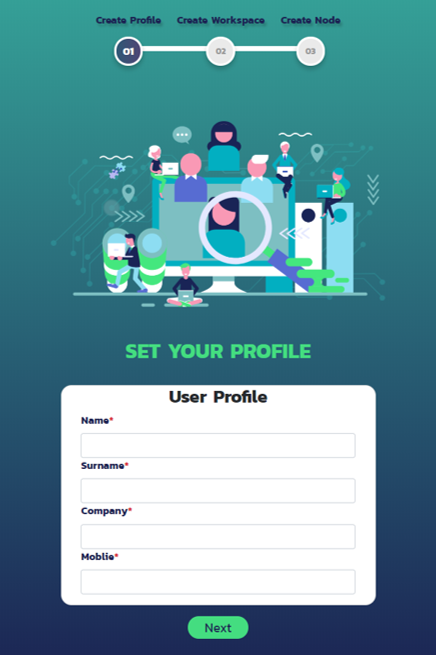
- Step 1 เป็นส่วนที่กรอกข้อมูลเบื้องต้นเกี่ยวกับผู้ใช้งาน ได้แก่ ชื่อ นามสกุล บริษัท และหมายเลขโทรศัพท์
Note
- ผู้ใช้งานสามารถแก้ไขข้อมูลในภายหลังได้จาก User Profile ดังรูปด้านล่าง
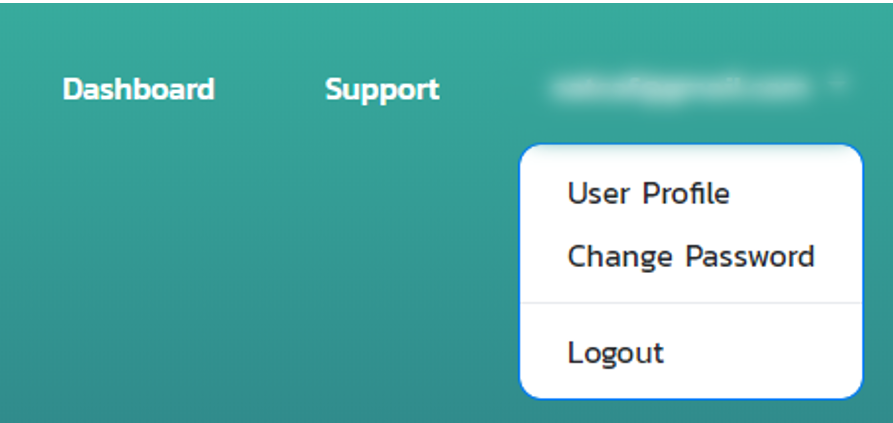
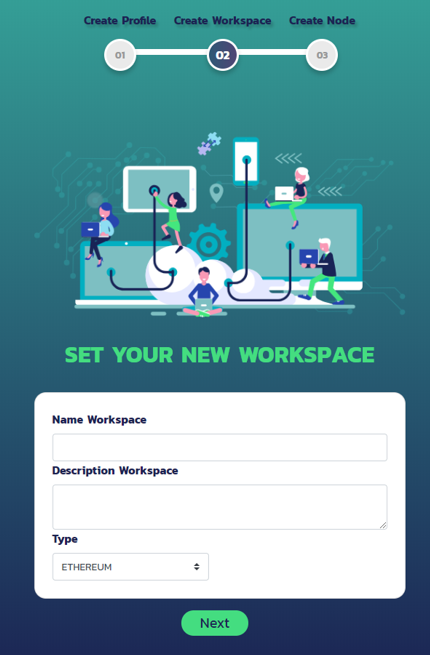
- Step 2 เป็นส่วนที่สร้าง Workspace(Network) โดยข้อมูลเบื้องต้นที่ต้องกรอก ได้แก่ ชื่อ Workspace คำอธิบายเกี่ยวกับ Workspace และชนิด Protocal ของ Blockchain
Note
- นอกจากนี้ผู้ใช้งานสามารถสร้าง Node ได้จากหน้า Dashboard => Create Workspace
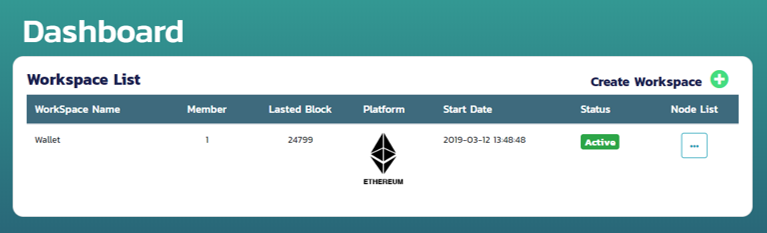
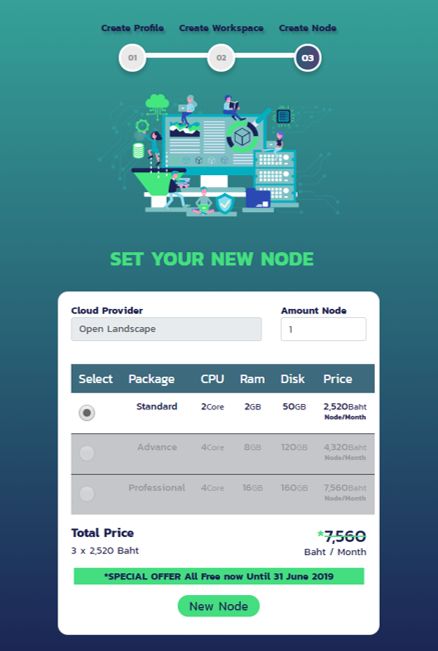
- Step 3 เป็นส่วนที่สร้าง node โดยสามารถเลือก package ตามการใช้งาน
Note
สำหรับผู้ทดสอบใช้งานฟรีจะสามารถใช้งานได้เฉพาะ Standard Package เท่านั้น
- นอกจากนี้ผู้ใช้งานสามารถสร้าง Node ได้จากหน้า Dashboard => Node List => New Node
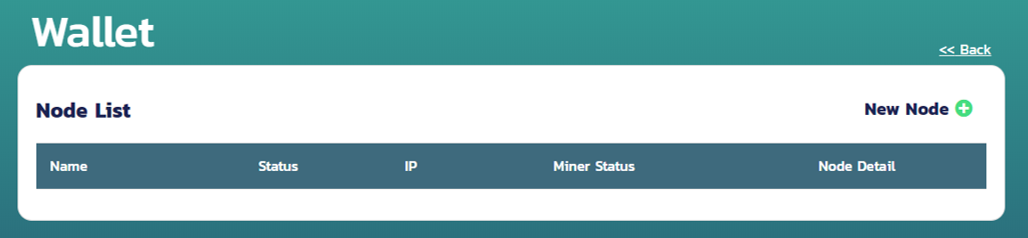
ใช้งาน Node
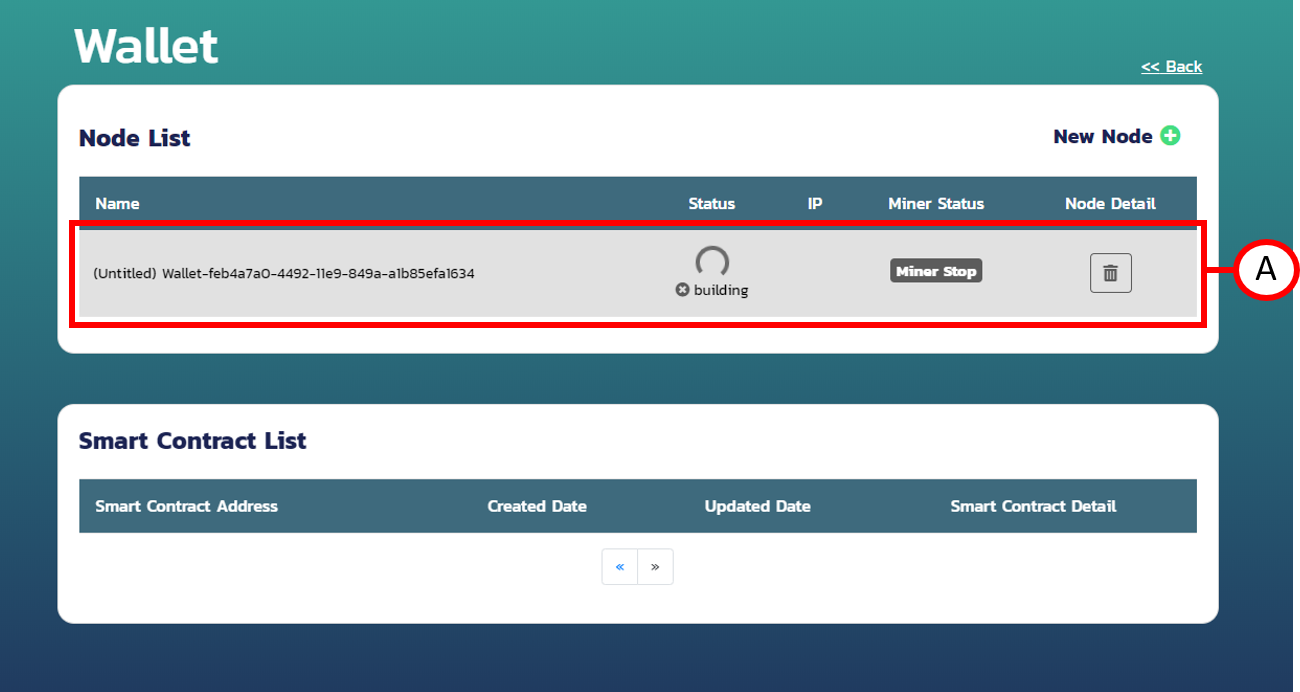
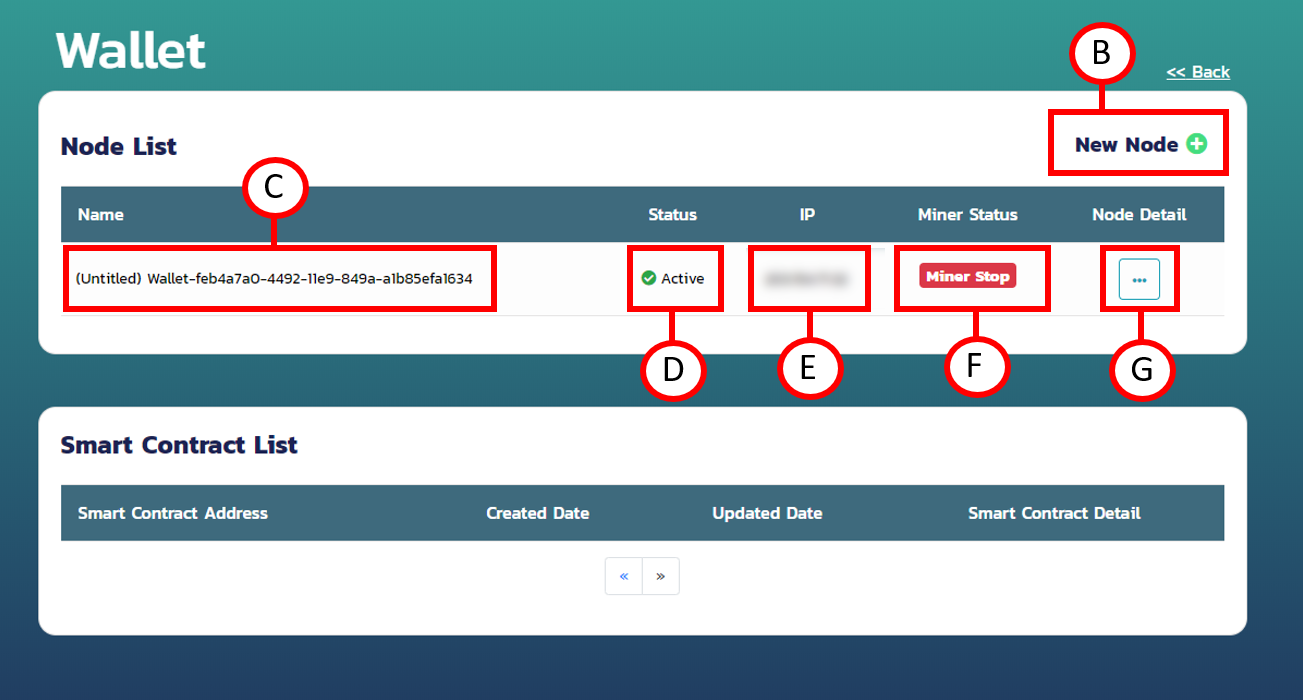
A.ระบบจะทำการ Build Node ทุกครั้งที่สร้าง Node ซึ่งจะใช้เวลาประมาณหนึ่งB.ปุ่มสำหรับสร้าง NodeC.ชื่อของ Node ทั้งนี้สามารถตั้งชื่อ Node ได้ใน Node DetailD.สถานะของ NodeE.หมายเลข IP ของ NodeF.สถานะการ Mining ของ NodeG.ปุ่มเพื่อดูรายละเอียดของ Node
Note
- การ Miner Start ครั้งแรก จำเป็นต้อง Create Address ก่อน Miner Start เสมอ
- การ Miner Start ครั้งแรก จำเป็นต้องรอ Generate DAG (Directed Acyclic Graph) ก่อน (ประมาณ 10-20 นาที)
สร้าง Account
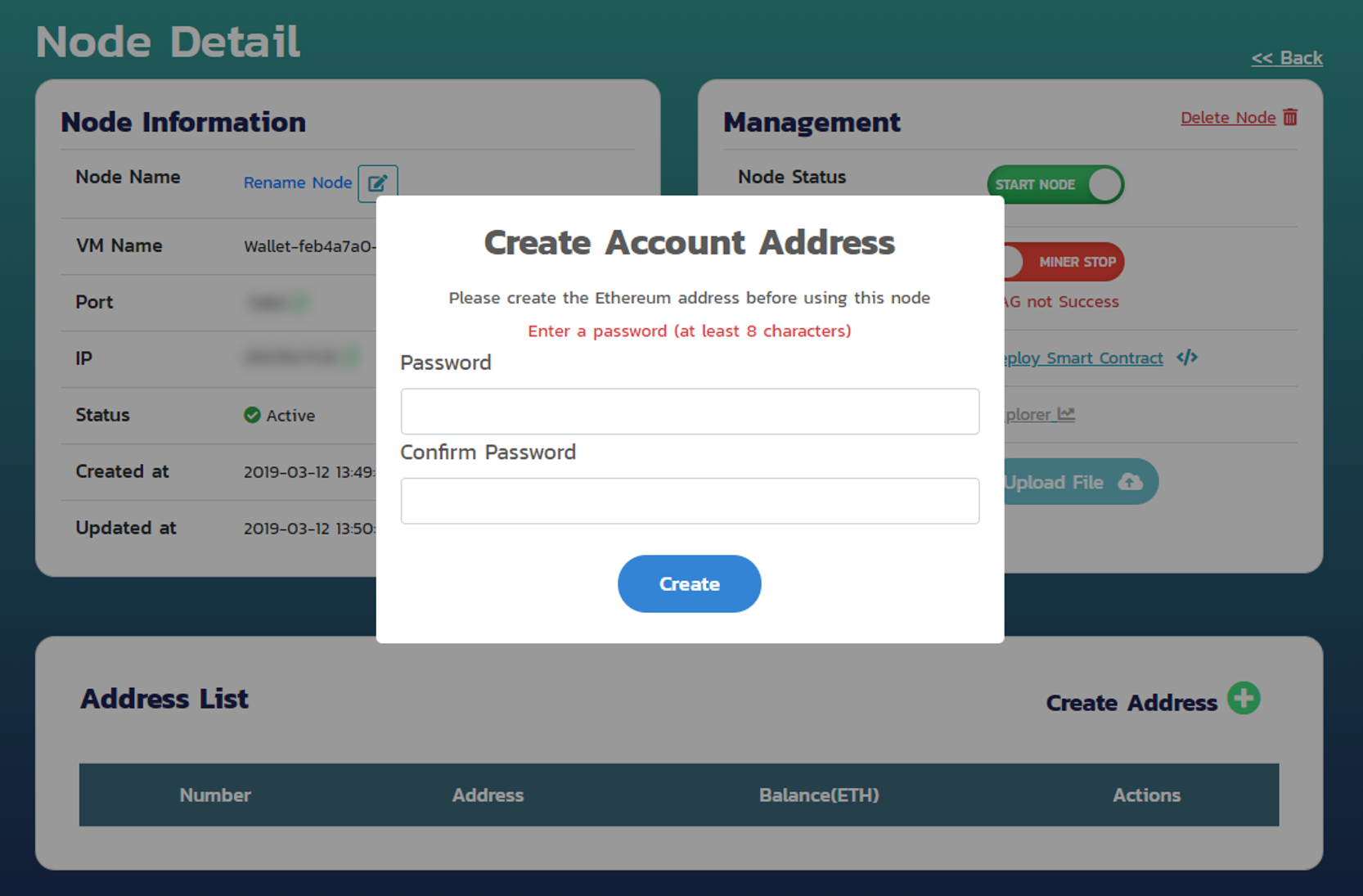
หลังจากการสร้าง Node ครั้งแรก จำเป็นต้องสร้าง Account Address ก่อนทุกครั้ง เพื่อยืนยัน Transaction หรือ Mining
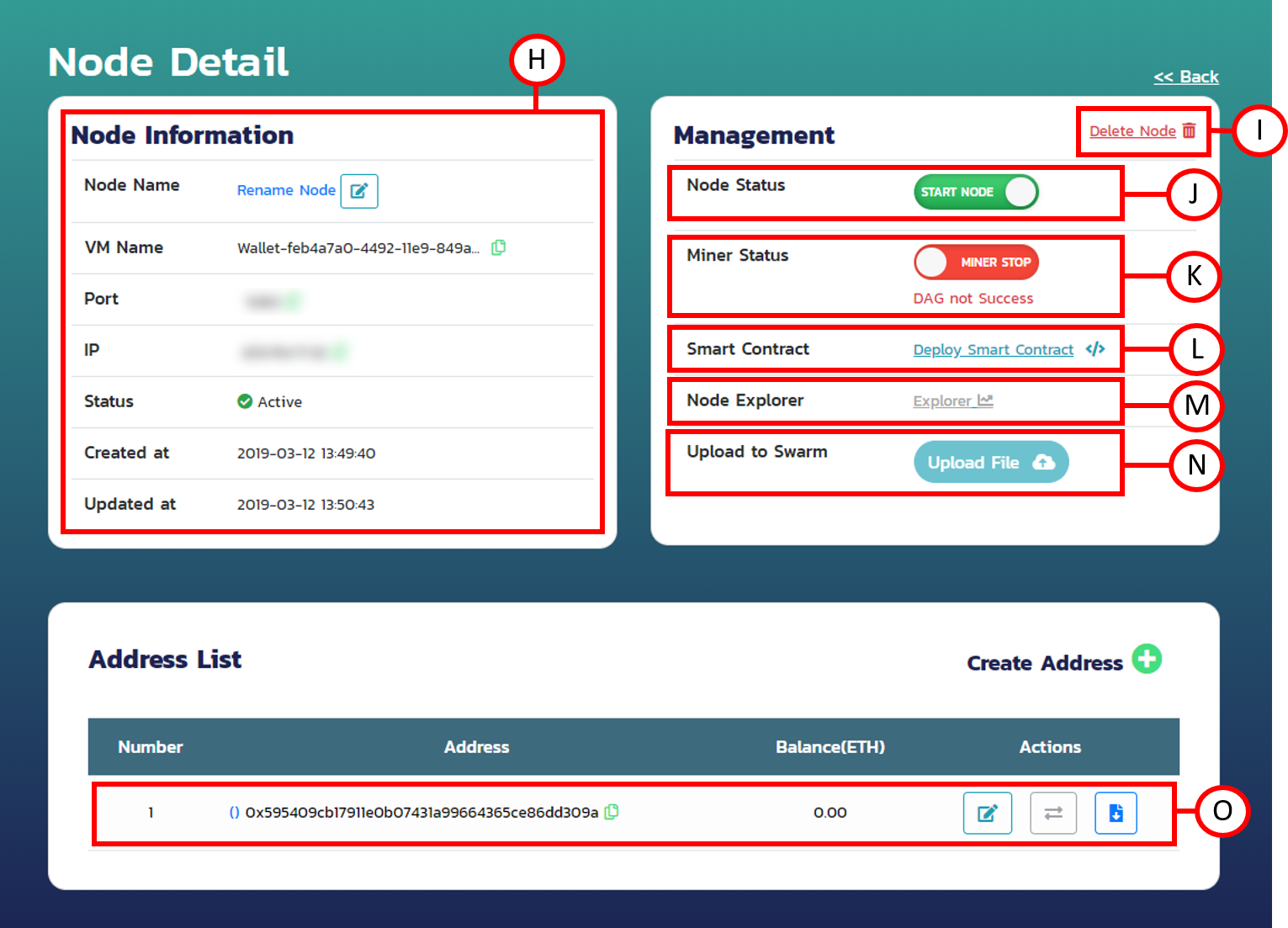
H.ข้อมูลเบื้องต้นเกี่ยวกับ Node ได้แก่- Node Name ชื่อ Node
- VM Name ชื่อ VM
- Port Port ของ Node ที่ใช้ติดต่อกับ Blockchain
- IP หมายเลข IP ของ Node
- Status สถานะของ Node
- Create at วันที่สร้าง Node
- Updated at วันที่ Node มีการแก้ไขล่าสุด
I.ลบ NodeJ.ปุ่มควบคุม Node StatusK.ปุ่มควบคุม Miner Status (การ Mining ครั้งแจกต้อง Generate DAG ก่อนเสมอ)L.ปุ่มสำหรับไปหน้า Deploy Smart ContractM.ปุ่มสำหรับดู Block ExplorerN.ปุ่มสำหรับ Upload File เก็บลงใน BlockchainO.ข้อมูลเบื้องต้นเกี่ยวกับ Account Address ได้แก่Number ลำดับของ Account Address
Address ชื่อของ Account Address
Balance Ether คงเหลือของ Account Address
Actions ประกอบไปด้วย
- เปลี่ยนชื่อ Account Address
- SendTransaction ส่ง Ether ให้ Account อื่นๆใน Workspace เดียวกัน
- Download Private Key
เขียน Smart Contract
ภาษาหลักที่ใช้ในการเขียน Smart Contract คือ Solidity โดยมีวิธีการเขียนเบื้องต้นดังนี้
pragma solidity >=0.4.0 <0.6.0;

    contract SimpleStorage {
        string storedData;

        function set(string x) public {
            storedData = x;
        }

        function get() public view returns (string) {
            return storedData;
        }
    }
- บรรทัดแรกหมายถึง Source Code นี้เขียนขึ้นสำหรับ Solidity เวอร์ขั่น 0.4.0 หรือเวอร์ชั่นที่ใหม่กว่า แต่ไม่เกินเวอร์ชั่น 0.6.0
- บรรทัดต่อมา ชื่อ Contract คือสิ่งที่ใช้อ้างอิงถึง Source Code ที่เราเขียน(เปรียบเสมือนฟังก์ชัน)
- บรรทัด uint storedData คือการประกาศตัวแปรพร้อมกับบอกชนิดของตัวแปร จากตัวอย่างคือ ตัวแปรชื่อ storedData ชนิด uint สามารถแก้ไขค่าของ storedData ในฟังก์ชัน set() และเรียกดูค่าของ storedData ในฟังก์ชัน get()
Note
สามารถดูตัวอย่าง Smart Contract เพื่อสร้าง Coin ได้ ที่นี่ จากข้างต้น เป็นเพียงตัวอย่างการเขียน Smart Contract โดยใช้ Solidity เบื้องต้นเท่านั้น สามารถดูศึกษาข้อมูลเพิ่มเติมเกี่ยวกับ Solidity ได้ที่ Solidity Document
Compile/Deploy Smart Contract
ต่อเนื่องมาจาก L. สำหรับ Compile และ Deploy Smart Contract ดังนี้
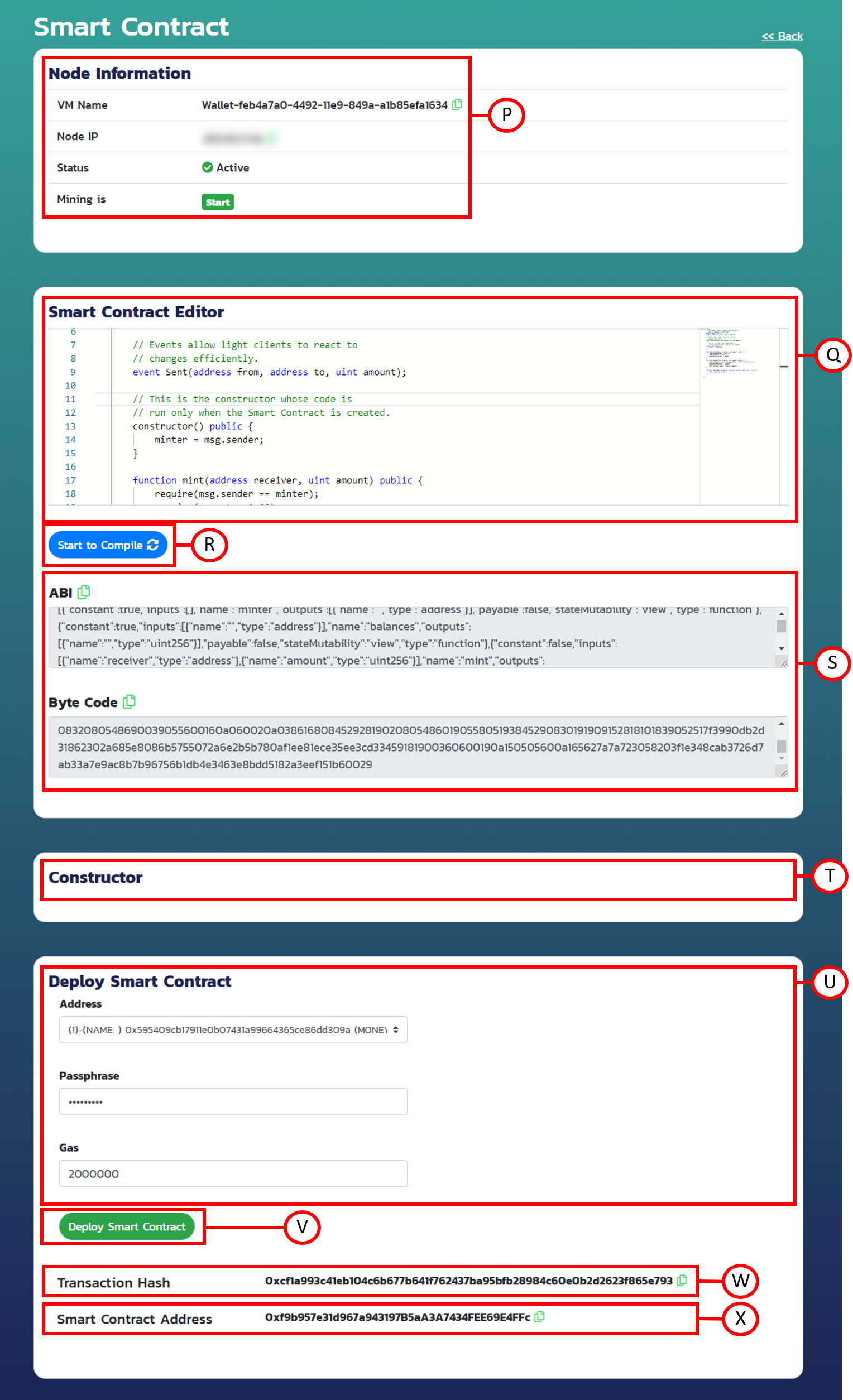
P.ข้อมูลเบื้องต้นเกี่ยวกับ NodeQ.ส่วน Editor สำหรับเขียนภาษา Solidity หรือ Smart ContractR.ปุ่มสำหรับ Compile Smart ContractS.แสดงผลของ ABI และ ByteCode หลังจาก Compile สำเร็จT.แสดง Constructor ในกรณีที่ Smart Contract มี ConstructorU.ส่วนประกอบต่างๆที่ใช้ในการอ้างอิงกับ Smart Contract ได่แก่- Address Account เพื่อระบุถึงบุคคลที่ Deploy Smart Contract
- Passphase รหัสลับสำหรับยืนยันตัวตนของ Account
- Gas จำนวนค่าธรรมเนียมสำหรับ Deploy Smart Contract
V.ปุ่มสำหรับ Deploy Smart ContractW.แสดง Transaction Hash เมื่อ Deploy Smart Contract สำเร็จX.แสดง Smart Contract Address เมื่อ Deploy Smart Contract สำเร็จ
หลังจากเขียน Smart Contract เรียบร้อย นำ Smart Contract มาใส่ในช่อง Solidity Editor (Q.) และกด Start to Compile (R.) จะมี ABI และ Byte Code แสดงมาดังรูป S. และกดปุ่ม Deploy (V.) จะมี Transaction Hash กับ Smart Contract Address แสดงออกมาดังรูป W. และ X.
ใช้งาน Web3
สร้างไฟล์ index.html
<html>
<style>
a {
color: red;
font-size: 20px;
}
</style>
<body>
<h1>Connect to Blockchain By Web3</h1>
IP: http://<input size="10" type="text" id="connect_ip" value="127.0.0.1">
PORT: <input size="3" type="text" id="connect_port" value="8545"><br/><br/>
Connect is: <a id="connect">false</a><br/><br/>
<button onclick="connectBlockchain()">Connect Blockchain by Web3</button><br/><br/>
<h1>Put ABI and Contract Address for use Smart Contract</h1>
ABI: <input size="100" type="text" id="abi" value='[
{
"constant": false,
"inputs": [
{
"name": "x",
"type": "string"
}
],
"name": "set",
"outputs": [],
"payable": false,
"stateMutability": "nonpayable",
"type": "function"
},
{
"constant": true,
"inputs": [],
"name": "get",
"outputs": [
{
"name": "",
"type": "string"
}
],
"payable": false,
"stateMutability": "view",
"type": "function"
}
]'><br/><br/>
Contract Address: <input size="50" type="text" id="contract_address" value="0xaf4a967c73ef4bd5c4a19f964dc53cb20714bc1f"><br/><br/>
Status is: <a id="put_contractaddress">Fail</a><br/><br/>
<button onclick="putContractAddress()">Put</button><br/><br/>
<h1>UnlockAccount</h1>
Account: <input size="50" type="text" id="unlock_account" value="0x8Be9645F153E64C717dD53a5127D94b763046145"><br/><br/>
Password: <input size="50" type="password" id="unlock_password" value=""><br/><br/>
Status is: <a id="message"></a><br/><br/>
<button onclick="unlockAccount()">Unlock Account</button><br/><br/>
<h1>Set</h1>
From: <input size="50" type="text" id="from" value="0x8Be9645F153E64C717dD53a5127D94b763046145"><br/><br/>
Text: <input size="50" type="text" id="text" value="120"><br/><br/>
Status is: <a id="set_message"></a><br/><br/>
Transaction is: <a id="set_transaction"></a><br/><br/>
Block Number is: <a id="set_blocknumber"></a><br/><br/>
<button id="set_button" onclick="set()">Set</button><br/><br/>
<h1>Get</h1>
Text: <a id="get_message"></a><br/><br/>
<button id="set_button" onclick="get()">Get</button><br/><br/>
</body>
<script src="https://cdn.jsdelivr.net/gh/ethereum/web3.js@1.0.0-beta.36/dist/web3.min.js" integrity="sha256-nWBTbvxhJgjslRyuAKJHK+XcZPlCnmIAAMixz6EefVk=" crossorigin="anonymous"></script>
<script type="text/javascript">
let web3;
let Contract;
let abi;
async function connectBlockchain() {
try {
let ip = document.getElementById("connect_ip").value;
let port = document.getElementById("connect_port").value;
web3 = await new Web3("http://"+ip+":"+port);
web3.eth.net.isListening().then(() => {
document.getElementById("connect").innerHTML = "Success";
document.getElementById("connect").style.color = "green";
web3.eth.getAccounts(console.log)
})
} catch(err) {
console.log(err);
document.getElementById("connect").innerHTML = "Fail";
document.getElementById("connect").style.color = "red";
}
}
async function putContractAddress() {
try {
abi = JSON.parse(document.getElementById("abi").value);
let contract_address = document.getElementById("contract_address").value;
console.log(abi);
Contract = new web3.eth.Contract( abi, contract_address);
document.getElementById("put_contractaddress").innerHTML = "Success";
document.getElementById("put_contractaddress").style.color = "green";
} catch(err) {
console.log(err);
document.getElementById("put_contractaddress").innerHTML = "Fail";
document.getElementById("put_contractaddress").style.color = "red";
}
}
async function set() {
try {
document.getElementById("set_message").innerHTML = "Waiting...";
document.getElementById("set_message").style.color = "orange";
document.getElementById("set_transaction").innerHTML = "Waiting...";
document.getElementById("set_transaction").style.color = "orange";
document.getElementById("set_blocknumber").innerHTML = "Waiting...";
document.getElementById("set_blocknumber").style.color = "orange";
document.getElementById("set_button").disabled = true;
let from = document.getElementById("from").value;
let text = document.getElementById("text").value;
Contract.methods.set(text).send( {from: from} ).then((result) => {
console.log(result)
document.getElementById("set_message").innerHTML = "Success";
document.getElementById("set_message").style.color = "green";
document.getElementById("set_button").disabled = false;
document.getElementById("set_transaction").innerHTML = result.transactionHash;
document.getElementById("set_transaction").style.color = "blue";
document.getElementById("set_blocknumber").innerHTML = result.blockNumber;
document.getElementById("set_blocknumber").style.color = "blue";
})
} catch(err) {
console.log(err);
document.getElementById("set_message").innerHTML = "Fail";
document.getElementById("set_message").style.color = "red";
document.getElementById("set_button").disabled = false;
}
}
async function get() {
try {
Contract.methods.get().call().then((result) => {
console.log(result)
document.getElementById("get_message").innerHTML = result;
document.getElementById("get_message").style.color = "blue";
})
} catch(err) {
console.log(err)
}
}
async function unlockAccount() {
try {
let account = document.getElementById("unlock_account").value;
let password = document.getElementById("unlock_password").value;
let message = await web3.eth.personal.unlockAccount(account, password);
document.getElementById("message").innerHTML = "Success";
document.getElementById("message").style.color = "green";
} catch(err) {
console.log(err);
document.getElementById("message").innerHTML = "Fail";
document.getElementById("message").style.color = "red";
}
}
</script>
</html>
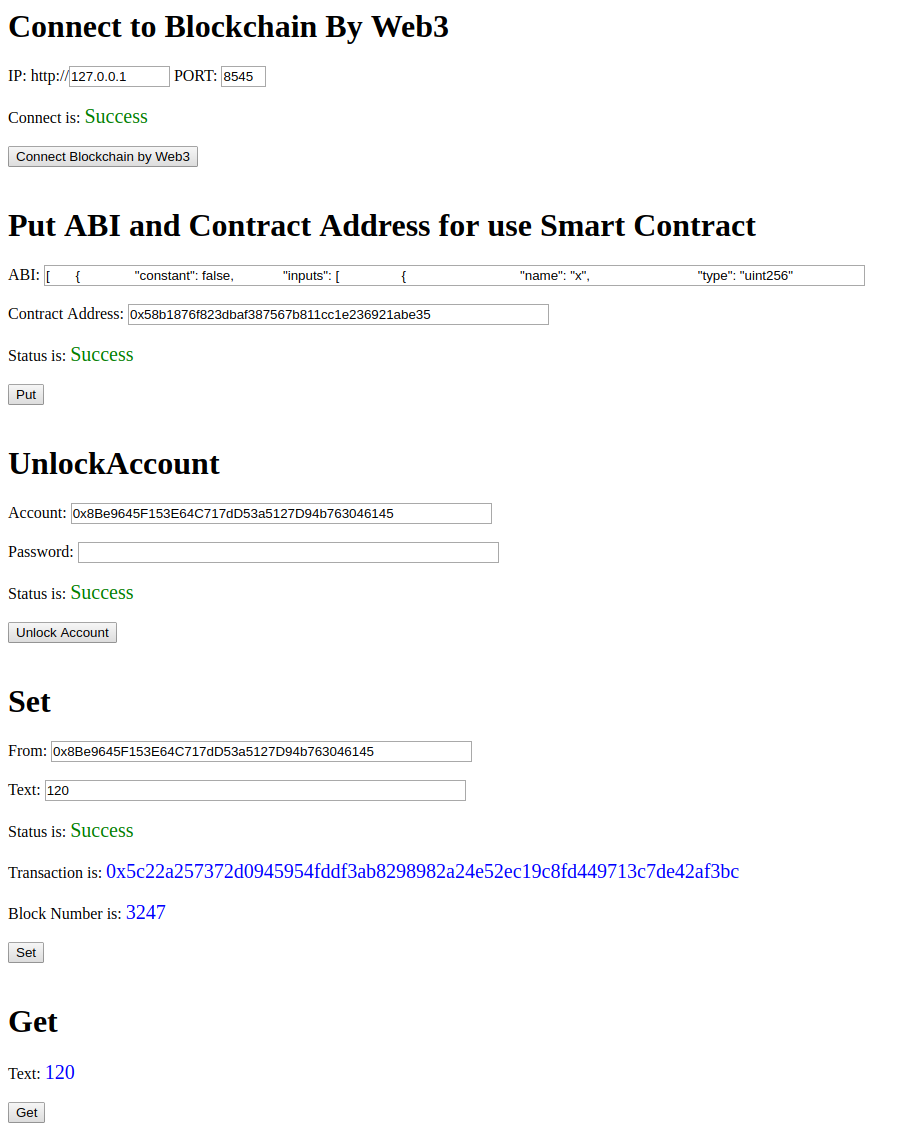
connectBlockchain() รับ IP และ Port มาจาก Input เพื่อนำไปติดต่อกับ Blockchain โดยใช้ Web3putContractAddress() รับ ABI และ Contract Address เพื่อใช้ในการเรียกใช้ Smart Contract โดยใช้ Web3set() รับ Account ที่ต้องการสร้าง Transaction ข้อความ(Text) และเรียกใช้ Function Set ที่อยู่ใน Smart Contract นั้นๆ พร้อมทั้งนำค่า TransactionHash BlockNumber ที่ได้ไปแสดงบนหน้าเว็บ โดยใช้ Contract ที่ได้จาก putContractAddress()get() เรียกใช้ Function Get ที่อยู่ใน Smart Contract นั้นๆ และนำค่า Text ที่ได้ไปแสดงบนหน้าเว็บ ซึ่งค่า Text จะเป็นข้อความที่เปลี่ยนแปลงล่าสุดจาก Function Set โดยใช้ Contract ที่ได้จาก putContractAddress()unlockAccount() ยืนยันตัวตนเพื่อนำไปใช้ในการสร้าง Transaction โดยใช้ Web3เมื่อเปิดไฟล์ index.html จะได้เว็บดังภาพ
Note
สามารถศึกษาข้อมูลเพิ่มเติมเกี่ยวกับ Web3 ได้ที่ Web3 Document